Smart Inbox
- Neo and AI
- Quotes and sales
Neo helps turn connected email into work: it identifies important requests, suggests the next action and prepares replies for review.
See which requests need attention
Link to this section: See which requests need attentionNeo assesses incoming email and applies your active labels. When it considers a message important, it can prepare a reply and recommend actions. That makes the inbox a starting point for work, with the suggested next step beside the conversation instead of another list to maintain.
Go from the message to a plan
Link to this section: Go from the message to a planImagine a producer emailing an equipment request for next week's shoot. Neo can suggest preparing a quote or importing an order. You choose the action, review the plan in the email's Neo conversation and check the proposed work. Selecting a suggestion starts that review; it isn't proof that the quote has been saved or sent.
Check the reply before sending
Link to this section: Check the reply before sendingA suggested reply uses the available email and client context, but stays a draft in Filmo until you send it. You can edit the wording, correct dates and include the right document before it goes out. Not every message gets a prepared reply: importance, labels, available credits and account settings affect that first pass.
Review the client's equipment list
Link to this section: Review the client's equipment listFor a detailed list, Import with Neo can analyse a PDF, spreadsheet, image, text or audio file and match its lines to your inventory. You check the client, dates, quantities and unmatched items before importing and saving a draft order. Email classification alone does not mean Neo has read every attachment.
Use it today
Link to this section: Use it todayThe guides and recordings below describe Filmo today. Screens and available options may have changed since this update.
Start with Neo's recommended email actions. Open the thread, choose the work to prepare and review it in the linked Neo conversation. The mailbox owner confirms with their own permissions; the connected email add-on and AI credits are required. Read how inbox assistance chooses messages if no draft appears.
For an attachment, follow Import an order with Neo. Resolve pending matches, import the accepted lines and save the draft. Importing does not reserve equipment; reserve it separately once the request is confirmed.
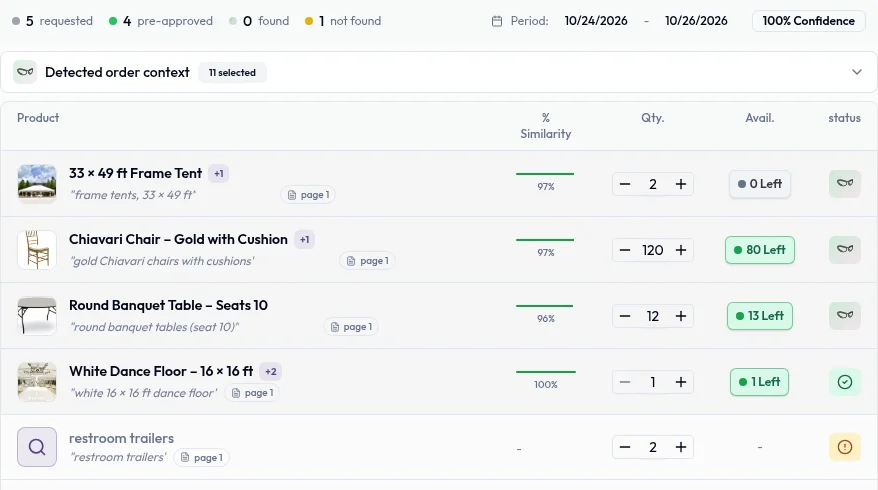
For a video overview, see Import orders in seconds in Filmo Academy.
Watch: Import orders in secondsReal product captures keep the language and theme of the recorded interface.
Academy videos have English audio and captions, including on Spanish lesson pages.
Related help articles
Related updates
Stay up to date
Get product updates, new blog articles, Filmo announcements and templates in your inbox.