Meet Neo
- Neo and AI
Ask about your operation in plain words, and let Neo prepare work for you to review.
Start with the job in front of you
Link to this section: Start with the job in front of youAsk which tents are free next weekend or what is going out tomorrow. Give Neo the dates and the order or item you mean, so it can look up the answer in your Filmo account instead of leaving you to assemble it from several screens.
From a request to a proposed change
Link to this section: From a request to a proposed changeIf a client needs 20 more chairs, ask Neo to prepare the order update. Read the proposed item, quantity and order before applying it. Preparing a quote or an incident opens its usual editor with data filled in: the record exists only after you review and save it.
Your permissions still apply
Link to this section: Your permissions still applyNeo can only read the modules your role can view, and applying a proposal requires the corresponding edit permission. A prepared change is not a completed change: check the result after applying it. Neo has no actions for deleting records.
Use it today
Link to this section: Use it todayThe guides and recordings below describe Filmo today. Screens and available options may have changed since this update.
Open Ask Neo, name the record and include the dates or quantities that matter. Start with a question, then follow Ask Neo a question to enable change proposals when you need them. Review the fields and the final result using Confirm or dismiss a proposal.
In the current interface, most changes require confirmation; creating or editing an internal service can run without it in Think deeply mode. Fast mode requires confirmation for those too. Document editors still require Save. Available modules, permissions and AI credit balance limit what Neo can do.
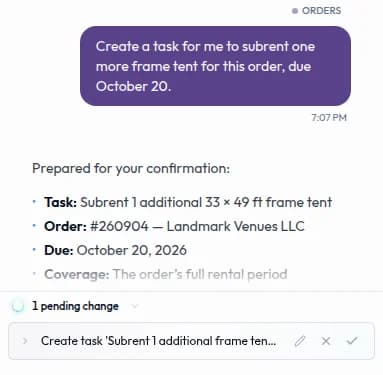
For a video overview, see Ask NEO in Filmo Academy.
Watch: Ask NEOReal product captures keep the language and theme of the recorded interface.
Academy videos have English audio and captions, including on Spanish lesson pages.
Related help articles
Related updates
Stay up to date
Get product updates, new blog articles, Filmo announcements and templates in your inbox.