Filmo Internal bookings 2.0
- Apps
A redesigned Internal bookings app, with a steadier cart, three languages and delivery and return signatures on the phone.
Keep the request together
Link to this section: Keep the request togetherNew icons, loading states and a calmer layout make the booking journey easier to follow. The cart keeps the equipment added while someone continues browsing. For a student collecting a camera, tripod and audio kit, that means building one request without reconstructing the list between screens.
Sign at collection and return
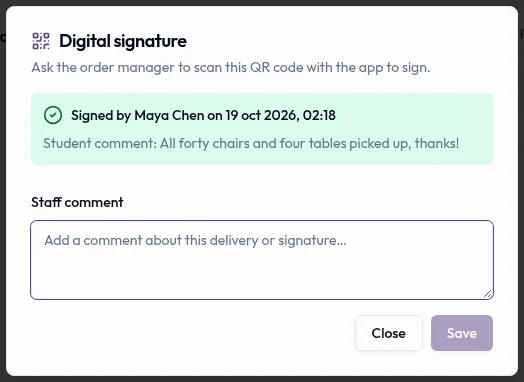
Link to this section: Sign at collection and returnBorrowers can confirm a delivery or return on their phone after scanning the QR code shown by the equipment desk. The confirmation stays with the corresponding operation in Filmo, giving the team a record of who signed and when. Signing and finishing the delivery remain separate actions.
More comfortable on different phones
Link to this section: More comfortable on different phonesThe app follows the phone's Spanish, English or French language. Its layout adapts to phones and tablets, with an updated availability calendar and chat filters to help people find the conversation with the equipment desk.
Fixes along the journey
Link to this section: Fixes along the journey- Opening hours display consistently across the app.
- Messages from the equipment desk are easier to read.
- The delivery and return signing flow is smoother.
- Password reset emails explain the next step more clearly.
Use it today
Link to this section: Use it todayThe guides and recordings below describe Filmo today. Screens and available options may have changed since this update.
For a collection today, follow the QR signing guide: open the delivery, choose «Sign delivery», let the order's contact scan and select the group, then check the signed status. A signature does not finish the operation or sign the printed delivery note.
Before that collection, review and reserve the app request. A submitted cart arrives as a draft and holds no equipment. The current guide describes Campus accounts; keep the request, reservation and signed handover as three distinct steps.
For a video overview, see Campus for schools in Filmo Academy.
Watch: Campus for schoolsReal product captures keep the language and theme of the recorded interface.
Academy videos have English audio and captions, including on Spanish lesson pages.
Related help articles
Related updates
Stay up to date
Get product updates, new blog articles, Filmo announcements and templates in your inbox.