Mention @Neo in team chat
- Neo and AI
- Orders and operations
Ask @Neo inside a team conversation so everyone in it can follow the answer and review proposed work together.
Ask where the discussion happens
Link to this section: Ask where the discussion happensMention Neo in a channel or direct message to bring a Filmo question into the conversation. The people already discussing the job can see the answer there, instead of relying on someone to copy it from a private assistant chat. Neo works with the access of the person who mentioned it.
From a shared question to a proposal
Link to this section: From a shared question to a proposalImagine the crew discussing an event where the client has asked for more chairs. Someone can mention @Neo with the order and the requested quantity. Neo explains its plan and, if it prepares a change, adds a card to the conversation. The team can check the target order and quantities before applying it.
A person still applies the change
Link to this section: A person still applies the changeNo change from team chat runs without confirmation. Any member of that conversation can act on the proposal, provided they have the permission needed for the change. The card records who applied or dismissed it, so the next person can see that it has already been handled.
Use it today
Link to this section: Use it todayThe guides and recordings below describe Filmo today. Screens and available options may have changed since this update.
Follow mentioning Neo in team chat: open the conversation, type @, select Neo and include the record and the result you want. A request uses the mentioner's access and credits; confirmation checks the person who actually applies it.
Read the card before acting. A proposed document may need its usual editor, while another change can be applied from the card. The proposal guide explains that distinction. If someone has already handled the card, review its result instead of submitting the same change again.
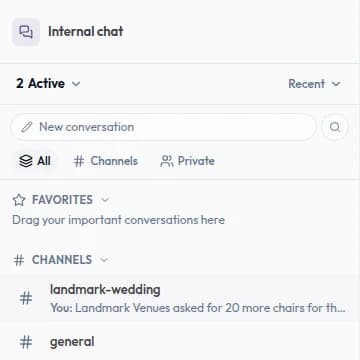
Real product captures keep the language and theme of the recorded interface.
Related help articles
Related updates
Stay up to date
Get product updates, new blog articles, Filmo announcements and templates in your inbox.