Documents, variants and dark mode
- Apps
- Equipment and inventory
Internal bookings brings documents and variant selection to the phone, alongside clearer availability and dark mode.
The booking's documents, close at hand
Link to this section: The booking's documents, close at handPeople can open the quotes, proformas and invoices available on their booking, preview the PDF and save or share it. That makes it easier to check the agreed equipment before collection without asking the equipment desk to send another copy. Pending delivery or return signatures remain accessible after the order is finished.
Choose the version you actually need
Link to this section: Choose the version you actually needItems with variants let the borrower choose the right version before adding it. The availability calendar follows that choice, and bulk items accept a quantity within the stock free for the selected dates. For example, someone preparing a student shoot can request the right cable length and several units, rather than sending a separate message to explain the difference.
A clearer way to browse
Link to this section: A clearer way to browseSearch includes kits as well as individual items. Day, week and month views help compare dates, while grid and list views suit browsing pictures or checking a longer equipment list. Changing the presentation doesn't change which resources the person is allowed to request.
The phone's language and appearance
Link to this section: The phone's language and appearanceThe app can follow the phone's appearance or use a chosen light or dark mode, and Catalan joins Spanish, English and French. People can choose their notification groups, keeping the updates they need for orders, projects or conversations.
Use it today
Link to this section: Use it todayThe guides and recordings below describe Filmo today. Screens and available options may have changed since this update.
Before asking someone to find a document, check what borrowers can open in the app: invoices and proformas must no longer be drafts; quotes expose the active and validated versions. The current guide calls this education account experience Campus.
If two variants show the wrong quantities, start with the item's variants and stock in Filmo. Give each stock row or serialized unit its correct variant, then check availability for the requested dates. A request still needs the equipment desk to reserve it.
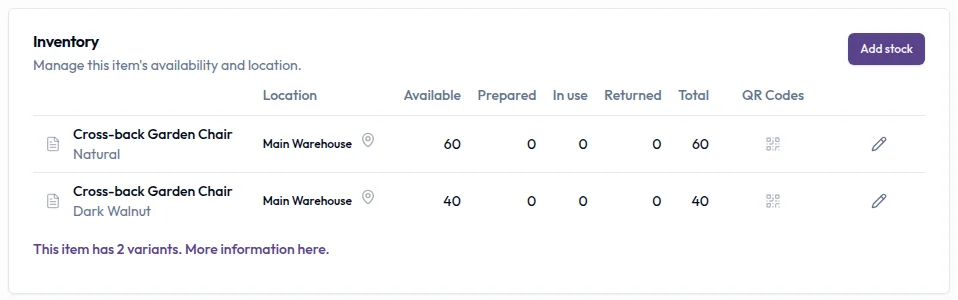
Real product captures keep the language and theme of the recorded interface.
Related help articles
Related updates
Stay up to date
Get product updates, new blog articles, Filmo announcements and templates in your inbox.