Team chat, inside Filmo
- Orders and operations
- Crew and planning
Keep your team's conversations close to the orders and projects they are working on.
Give each job a conversation
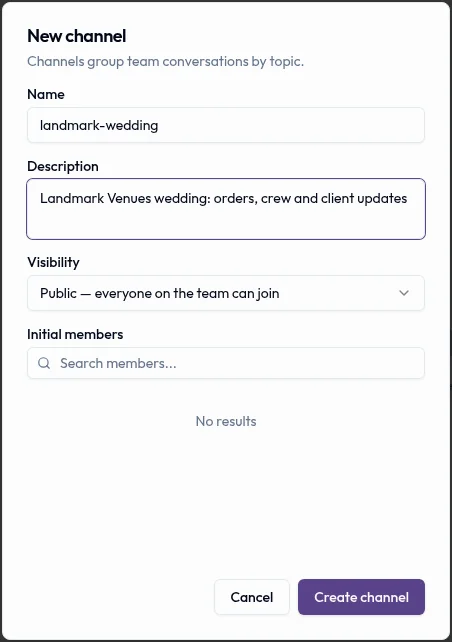
Link to this section: Give each job a conversationCreate a channel for the warehouse, a tour or a particular event, and add the people involved. When the warehouse finds a damaged tent before a delivery, sales and the crew lead can coordinate in the same conversation. Direct messages cover the quick exchanges that do not need a channel.
Put lasting instructions on the record
Link to this section: Put lasting instructions on the recordA channel carries the conversation; a note keeps a specific instruction with the job. Leave “Use the rear loading entrance before 8 a.m.” on the order and mention the person preparing it. The notification opens that record, so they can read the instruction alongside its details.
Invite the people who need to be there
Link to this section: Invite the people who need to be thereTeam chat is for people with access to your Filmo account, not clients or visitors. Add the required members when creating the channel. In channels, mentions generate notifications; direct messages notify the other participants. A muted conversation does not notify you.
Use it today
Link to this section: Use it todayThe guides and recordings below describe Filmo today. Screens and available options may have changed since this update.
In Communication → Internal Chat, choose New conversation → New channel, give it a useful job name and add the initial members. Create a channel and add people explains public and private channels. Public channels currently have no self-service join or discovery, so explicitly add the team members who need access.
For a delivery instruction that should stay with the order, follow Add a note and mention a teammate. Notes have no replies or edit action: write a new note to correct one, or delete and replace it. Anyone on the team can delete a note.
For a video overview, see Client messages, team chat and notifications in Filmo Academy.
Watch: Client messages, team chat and notificationsReal product captures keep the language and theme of the recorded interface.
Academy videos have English audio and captions, including on Spanish lesson pages.
Related help articles
Related updates
Stay up to date
Get product updates, new blog articles, Filmo announcements and templates in your inbox.