Maintenance and repairs
- Equipment and inventory
Record damage, take affected equipment out of availability and follow the repair and its costs.
A fault found at return should not get lost before the next load-out. Maintenance keeps the incident, the affected equipment and the repair together, so the warehouse can see what needs attention and the office can follow the cost.
Record what happened
Link to this section: Record what happenedOpen an incident from an item or a return, add the description and photos, and follow its progress in the list or board. Identify the actual unit or affected quantity: two damaged fixtures should not take the rest of the category out of service.
For example: a damaged light on return
Link to this section: For example: a damaged light on returnSuppose a light comes back with a broken connector before another job. Record the incident and enable the availability block so it is no longer counted as available. Check any orders that already had it assigned: blocking does not replace equipment on existing reservations.
Keep the repair and billing separate
Link to this section: Keep the repair and billing separateUse a repair ticket to record the work and its cost. Convert it into a purchase order for the workshop, or a sales document for a charge agreed with the client, then review the document before saving. Creating an incident alone does not block stock, and creating a repair ticket does not move money.
Use it today
Link to this section: Use it todayThe guides and recordings below describe Filmo today. Screens and available options may have changed since this update.
Use Block damaged equipment to identify the affected quantity and turn on the block. The availability block guide explains when it ends and why existing bookings need a separate check.
When a repair needs a supplier order or a client charge, follow Convert a repair ticket. Set the supplier and taxes where needed, and remove any lines that do not belong on that document.
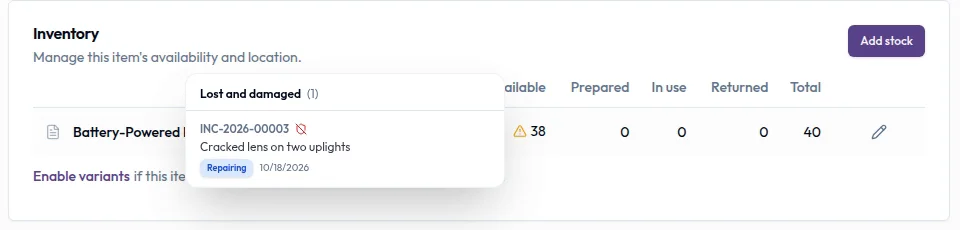
Real product captures keep the language and theme of the recorded interface.
Related help articles
Related updates
Stay up to date
Get product updates, new blog articles, Filmo announcements and templates in your inbox.