Subrentals and purchase orders
- Equipment and inventory
- Finance
Cover an order’s shortage with a subrental or a stock purchase, and keep the supplier’s costs linked to the job.
When an order needs more equipment than is available, the missing quantity is only the beginning. You also need to decide whether to hire it in for this job or buy it for future work, and record the supplier, dates and cost.
Temporary equipment or your own stock
Link to this section: Temporary equipment or your own stockFrom the order’s availability, add a subrental for temporary stock tied to that order and its dates, or a stock purchase for equipment you will keep. Then create the purchase order and enter the supplier and their price. The stock action and the supplier document are separate steps.
For example: twenty extra chairs
Link to this section: For example: twenty extra chairsImagine a conference needs 120 chairs and you have 100 available. Subrent 20 if the extra demand is temporary; buy 20 if you need them regularly. For a subrental, the dates must cover the full rental period. Temporary stock does not become available to every other order.
Receive the delivery and follow the cost
Link to this section: Receive the delivery and follow the costRecord what arrives, including partial deliveries. Stock added from the order is already counted, so receiving its purchase order does not add it again. The purchase order contributes to forecast cost; the validated supplier invoice contributes to actual cost. Keep both linked to the correct order or project.
Use it today
Link to this section: Use it todayThe guides and recordings below describe Filmo today. Screens and available options may have changed since this update.
Follow Subrent missing equipment or Buy missing stock for an order for the two paths. Purchasing needs its add-on and the appropriate permissions.
Before recording a delivery, check Receive a purchase order: free-text lines do not create stock, and serialized units received as new stock still need their codes and serial numbers.
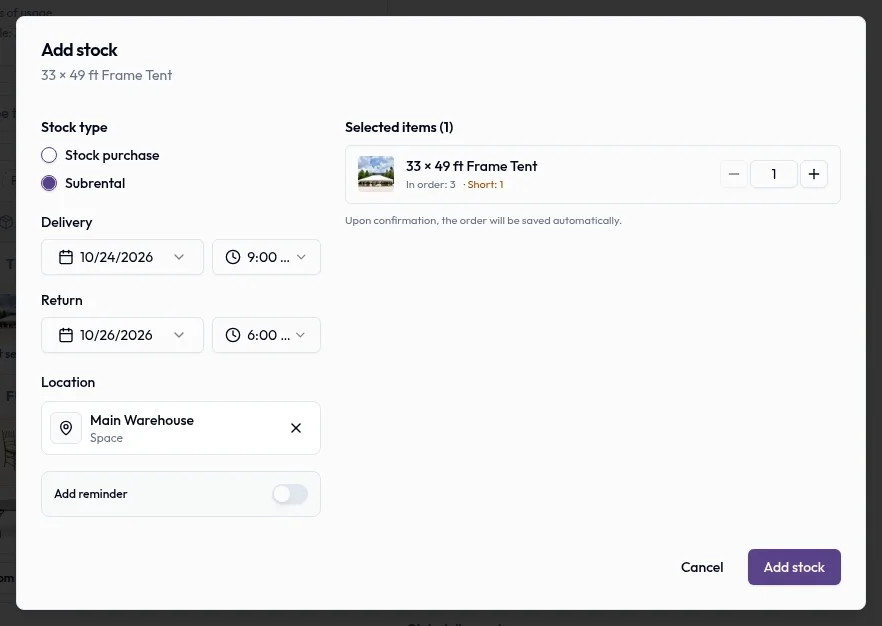
Real product captures keep the language and theme of the recorded interface.
Related help articles
Related updates
Stay up to date
Get product updates, new blog articles, Filmo announcements and templates in your inbox.