A pipeline for opportunities
- Quotes and sales
Follow opportunities from the first enquiry to won or lost, with the client and the work linked to each one.
Before there is an order, there is a conversation to follow up. The CRM gives each potential job a card with its client, value, expected close date and stage, so the sales team can see which enquiries need attention and which are progressing.
Stages that fit your sales process
Link to this section: Stages that fit your sales processUse a pipeline for the path your sales follow, with a column for each stage. Move opportunity cards as you contact the client, prepare a proposal and negotiate. Separate pipelines can reflect different sales processes, such as events and longer rentals.
For example: a conference enquiry
Link to this section: For example: a conference enquiryImagine a venue asks for sound equipment for a conference. Create the opportunity, move it forward when the proposal is sent and link the quote and order as you prepare them. Someone taking over the enquiry can find both the commercial conversation and the work it concerns.
Close the sale without skipping the work
Link to this section: Close the sale without skipping the workMove the card to a won or lost stage when the client decides. Winning records the outcome; it does not create an order or a quote. Linking or confirming a document also does not move the card for you, so keep the pipeline up to date as part of your follow-up.
Use it today
Link to this section: Use it todayThe guides and recordings below describe Filmo today. Screens and available options may have changed since this update.
Use Track an opportunity to create the card, and link its orders, quotes and project once they exist. The CRM currently needs its add-on; creating and moving cards requires edit access.
An administrator can configure pipelines and stages. Include both won and lost stages. The closing guide explains the current limitation of “Mark as lost”: use the lost column on the board.
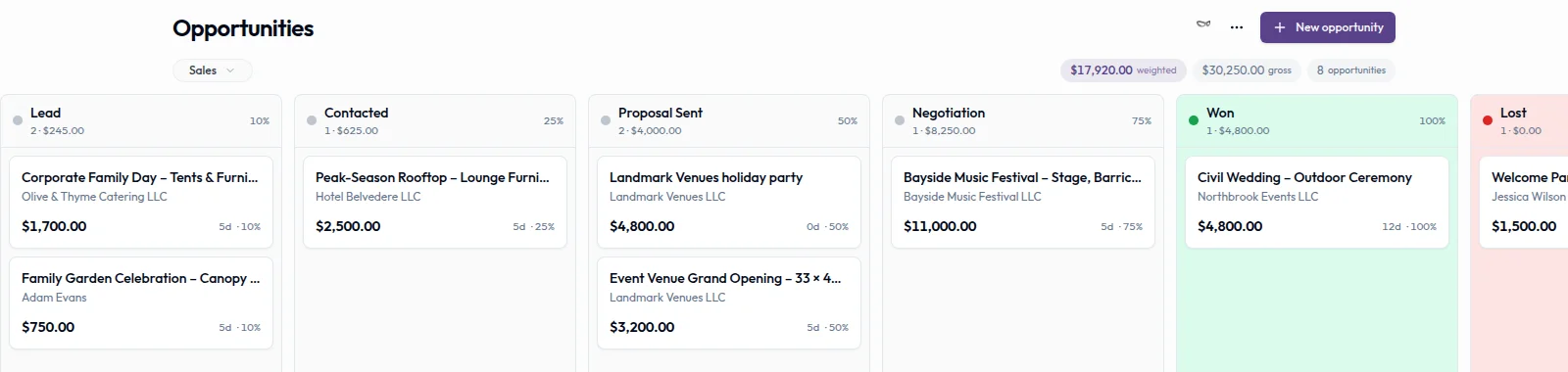
Real product captures keep the language and theme of the recorded interface.
Related help articles
Related updates
Stay up to date
Get product updates, new blog articles, Filmo announcements and templates in your inbox.