Deposits, insurance and partial invoicing
- Quotes and sales
- Finance
Set insurance and a security deposit, record an advance payment and invoice a rental by percentage or period.
An insurance charge, a refundable security deposit and an advance payment serve different purposes. Keeping them separate makes it clearer what the client is paying for, what is held as a guarantee and what has already been paid towards the job.
Insurance and security deposits
Link to this section: Insurance and security depositsSet insurance on the order as a percentage or fixed amount and choose which eligible lines it covers. It becomes part of the order’s total and appears on documents created from it. The security deposit is shown separately below the total; setting its amount does not record a collection.
For example: a hire paid in two stages
Link to this section: For example: a hire paid in two stagesImagine a client pays 50% before an event and the remaining 50% afterwards, with a separate security deposit. Create the two percentage invoices and track each payment. For a longer hire, invoice a date range instead. Check previous invoices yourself: overlapping periods and percentages above 100% are not prevented.
Record advances and refunds deliberately
Link to this section: Record advances and refunds deliberatelyAn advance on a quote records money already paid towards the job. When you convert that quote to an invoice, its advance payments are assigned to the invoice. A security deposit stays separate from invoice payments until you deliberately convert it; record its refund after reviewing the returned equipment.
Use it today
Link to this section: Use it todayThe guides and recordings below describe Filmo today. Screens and available options may have changed since this update.
Begin with Add insurance and a deposit to an order. For the money itself, follow Collect and refund a security deposit: the refund action records a full refund, not a partial one.
Use Invoice part of an order to create each agreed share. For now, avoid «Deduct invoices»: it reduces the displayed total but leaves the stored amount unchanged, so the payment balance can be wrong. Use separate percentage or period invoices instead. For money paid on a quote, follow Record an advance payment; recording an advance does not issue an invoice.
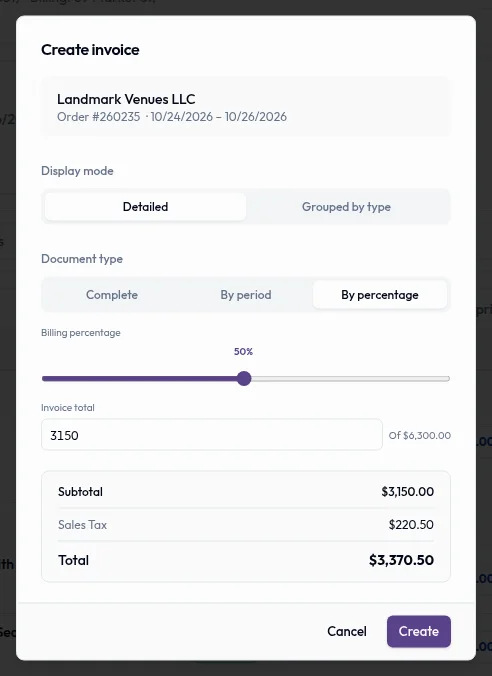
Real product captures keep the language and theme of the recorded interface.
Related help articles
Related updates
Stay up to date
Get product updates, new blog articles, Filmo announcements and templates in your inbox.