Custom roles and organizations
- Platform
Give each person the access their work needs, and organize several business accounts together.
Permissions for the work each person does
Link to this section: Permissions for the work each person doesThe warehouse needs to prepare deliveries; sales needs to price orders; the accountant needs invoices. Assign a predefined role or set View and Edit permissions by module for each person. A custom role applies to that person's account access; it is not a named role template you reuse.
Several accounts, with clear boundaries
Link to this section: Several accounts, with clear boundariesAn organization groups your locations or companies while each full account keeps its own inventory, orders, contacts and numbering. A billing account serves a different tax identity for a parent full account and shares that parent's contacts and projects. Grouping accounts does not merge their stock or client lists.
Access and sensitive changes in one place
Link to this section: Access and sensitive changes in one placeGive a manager access to the accounts they work in, with a role in each, then switch accounts without signing out. Security history records invitations, permission changes and other sensitive actions. It does not record sign-ins or failed sign-in attempts.
Use it today
Link to this section: Use it todayThe guides and recordings below describe Filmo today. Screens and available options may have changed since this update.
Start in Settings → Team and security: list the modules a person actually needs before assigning their role. Roles and permissions explains the View/Edit choices and the exceptions. Permissions cover a whole module, not selected clients, individual orders or fields.
Before adding another company, map which accounts need separate operations and which only need to invoice. How organizations work explains activation by the Filmo team and the paid account units. The structure cannot be unlinked or rearranged from the app, so choose the parent account before adding a billing account.
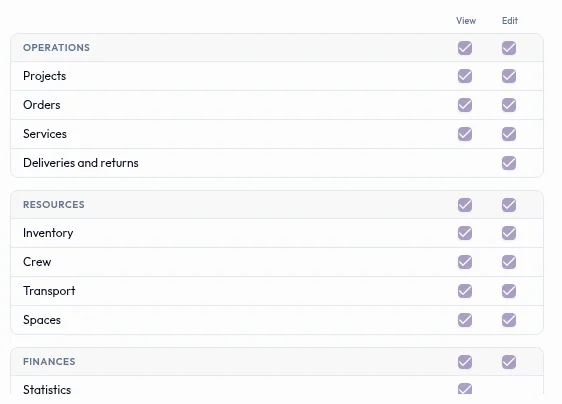
For a video overview, see Your team and their permissions in Filmo Academy.
Watch: Your team and their permissionsReal product captures keep the language and theme of the recorded interface.
Academy videos have English audio and captions, including on Spanish lesson pages.
Related help articles
- Roles and permissionsSign-in, team and permissions
- How organizations workOrganizations and billing accounts
- What each account keeps and what the organization sharesOrganizations and billing accounts
- Give someone access to several accountsOrganizations and billing accounts
- Security historySign-in, team and permissions
Stay up to date
Get product updates, new blog articles, Filmo announcements and templates in your inbox.