Price templates and other currencies
- Quotes and sales
- Equipment and inventory
Reuse duration-based pricing rules across equipment and present quotes and invoices in the client’s currency.
A three-day hire does not always cost three times the daily rate. Price templates let you define the duration tiers once and apply the same multipliers to equipment with different base prices, so the starting quote follows your pricing policy.
One set of tiers, different base prices
Link to this section: One set of tiers, different base pricesSet a multiplier for each duration and choose the template on the item’s rental price. For an item that needs its own fixed amounts per tier, use a custom structure instead. A template needs to be assigned before its rules affect new order lines.
For example: a weekend rate
Link to this section: For example: a weekend rateImagine two lights with daily base prices of €100 and €200 using a three-day multiplier of 2.5. Their three-day rental prices become €250 and €500 before other order adjustments. You maintain the duration rule once while each item keeps its own base price.
The currency the client needs
Link to this section: The currency the client needsChoose the document’s language and currency when preparing a quote or invoice. The document saves its exchange rate and date, while the editor keeps the account currency. Review the preview before sending. Each document has its own rate, and changing a template does not rewrite existing order lines.
Use it today
Link to this section: Use it todayThe guides and recordings below describe Filmo today. Screens and available options may have changed since this update.
Use Create a price template to set the tiers, then assign it on the item’s rental price card. The pricing modes guide helps distinguish a shared template from a custom structure or a flat price.
Follow Issue a document in another currency and verify the rate and preview. The rate is looked up when you choose the currency; you cannot type a custom rate, and choosing it again is how you refresh it.
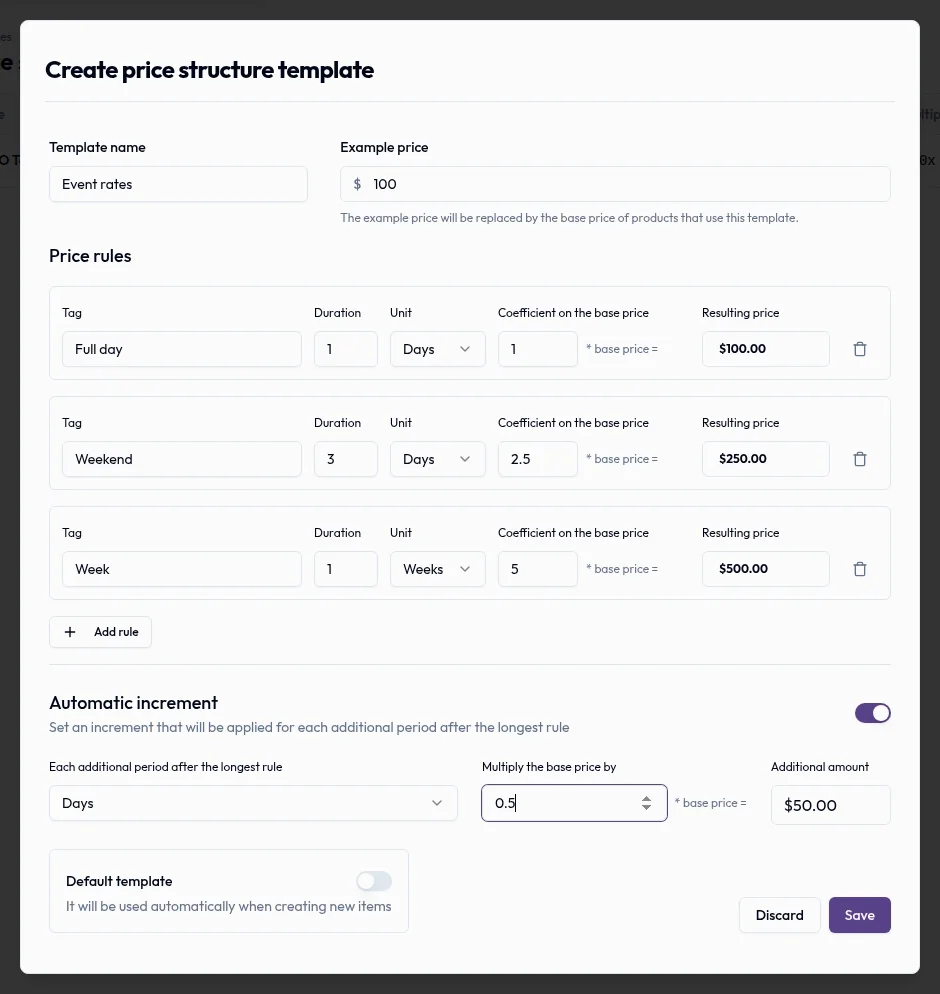
Real product captures keep the language and theme of the recorded interface.
Related help articles
- How pricing works in FilmoPricing, taxes and currency
- Create a price templatePricing, taxes and currency
- Pricing modes: price per period, fixed price and pricing structurePricing, taxes and currency
- Edit or delete a price templatePricing, taxes and currency
- Issue a quote or invoice in another currencyPricing, taxes and currency
Related updates
Stay up to date
Get product updates, new blog articles, Filmo announcements and templates in your inbox.