Several versions of one quote
- Quotes and sales
Send a revised proposal under the same quote number while keeping the earlier versions available.
A client changes the dates, adds equipment or asks for another price. Quote versions let you prepare that next offer without overwriting the one they have already read, keeping the negotiation together instead of scattering it across separate quotes.
One quote, a history of proposals
Link to this section: One quote, a history of proposalsAdd a new version when you want to preserve the previous offer. Versions share the quote number and its links to the job, while keeping their own lines, amounts, dates and status. Using Edit changes the active version; it does not create another one.
For example: twenty more chairs
Link to this section: For example: twenty more chairsImagine the first proposal includes 120 chairs and the client now needs 140. Update the order if it should change too, then add a quote version from the current order data. If you only want to adjust the proposal, start from the current quote version instead. Review and save the new offer.
Choose which version is current
Link to this section: Choose which version is currentThe active version is the one Filmo uses when you send, print or download the quote. Earlier versions stay available to preview individually. Filmo does not highlight differences between versions, so check the relevant PDFs before sending. Making an older version active again returns it to pending.
Use it today
Link to this section: Use it todayThe guides and recordings below describe Filmo today. Screens and available options may have changed since this update.
Follow Create a new version of a quote to choose between current order data and a copy of the active proposal. Save the new version and check it before sending.
The quote versions guide explains active and superseded versions. A new version supersedes pending versions, while a previously confirmed version can stay confirmed; review statuses as well as prices when switching proposals.
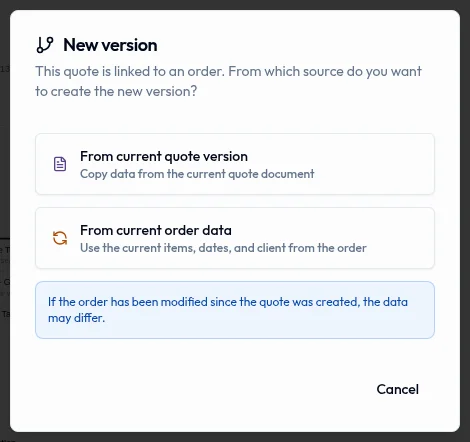
Real product captures keep the language and theme of the recorded interface.
Related help articles
Related updates
Stay up to date
Get product updates, new blog articles, Filmo announcements and templates in your inbox.