A new sidebar and search
- Platform
Arrange your sidebar around your work and find operational records from one search.
Find your way by area
Link to this section: Find your way by areaOrders, projects, resources, finances and communication have clear places in the sidebar. Reorder or hide entries and sections around the work you do most. The entries you see depend on your role and account modules, so a warehouse colleague's navigation can differ from an administrator's.
Go straight to the record
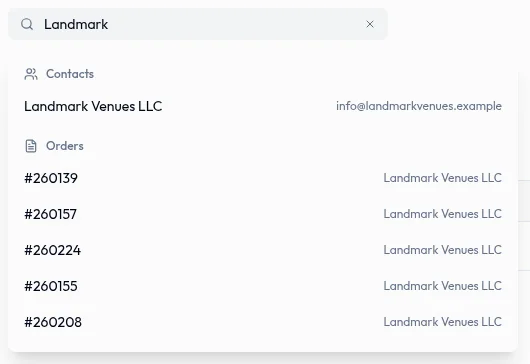
Link to this section: Go straight to the recordRemember a client's name but not the order number? Search in the top bar to see matching contacts, orders and other operational records grouped by type. Use the arrow keys and Enter to open a result. Only records from modules you can view are returned.
Use the right search for the job
Link to this section: Use the right search for the jobGlobal search covers items, kits, orders, contacts, spaces, projects, services, vehicles and staff. Quotes, invoices, other documents, payments and tasks are searched in their own lists. In those lists, combine status, date or other available filters to narrow the work you need to review.
Use it today
Link to this section: Use it todayThe guides and recordings below describe Filmo today. Screens and available options may have changed since this update.
Press / outside a text field, type a client or item name, and open a matching record. Search across Filmo explains the supported records and why a saved record may not appear immediately. If a document is missing from global search, open its own list instead.
For a recurring review, set a date range and status in a list, then save that combination with a useful name. Follow Filter a list to make it your default. Saved filters are personal and belong to the account you are working in.
For a video overview, see A tour of Filmo in Filmo Academy.
Watch: A tour of FilmoReal product captures keep the language and theme of the recorded interface.
Academy videos have English audio and captions, including on Spanish lesson pages.
Related help articles
Stay up to date
Get product updates, new blog articles, Filmo announcements and templates in your inbox.